There are dozens of situations in a company when a wrong email goes to a customer - wrong recipient, missing attachments, incorrect data. There can be many reasons for sending such an email - fatigue, haste, or simply an accident. Regardless of how many there are, they can cause you serious trouble.
How do you get out of such situations? And are there features that can help prevent a disaster? Fortunately, yes.
There are systems like Sugester - an easy-to-use CRM and helpdesk system that, in addition to standard email features, also offers the option to cancel email sending, which you can use whenever you need it. Thanks to it, your email might never see the light of day - as long as you react in time.
Let's first look at how popular email services handle unsending emails.
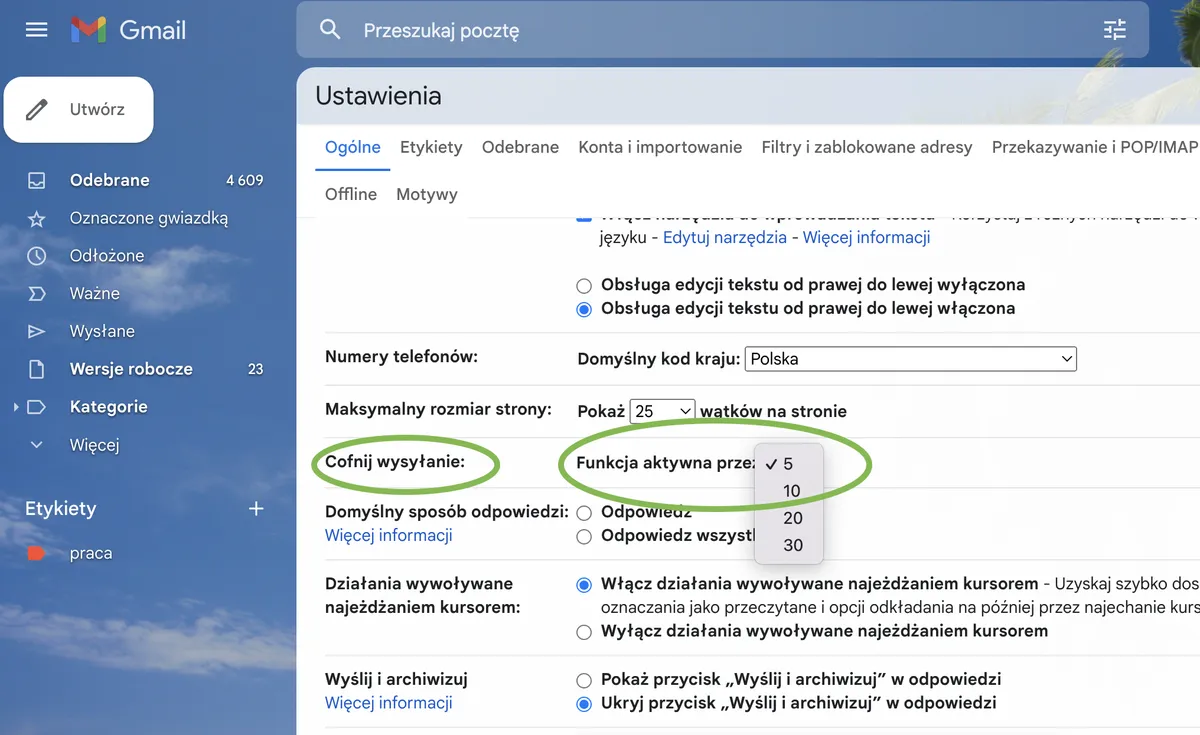
If you use Gmail - great news! You can enable the unsend feature in settings. How does it work? Gmail simply delays sending the email, so you can still cancel it for a moment after clicking "send". You have up to 30 seconds, if you set it that way in Gmail settings.
Here's what Gmail says about this feature:
If you decide that sending an email was premature, for a short while after sending it you can still cancel it. Here's how:
To set how long you have to cancel sending:

In outlook.com, like in Gmail, you can delay sending a message by 5 or 10 seconds.
As Microsoft support writes on their website, the unsend option can be enabled as follows:
Once you've configured the undo send feature, an "Undo send" prompt will appear at the bottom of the message list each time you send a new message. The prompt will be available for the time set in the "Compose and reply" window.
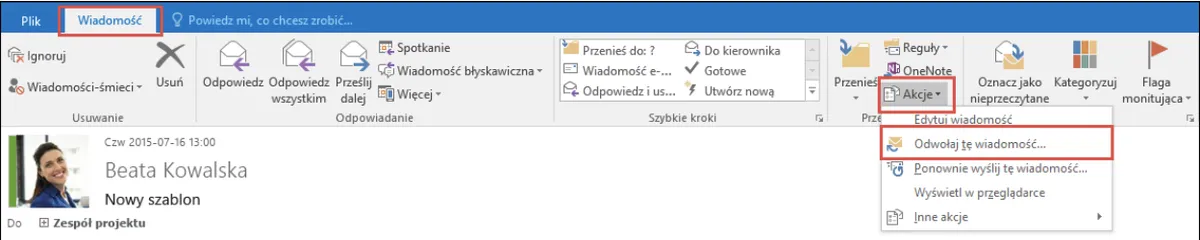
In Outlook for Windows, there's also an option to recall a message, which means retrieving the sent message from recipients' mailboxes. However, there's one important condition - this only applies to messages that have not been opened by the recipient. Additionally, the message recall feature is only available when both the sender and recipient have a Microsoft 365 or Microsoft Exchange email account in the same organization. You cannot, for example, recall a message sent to or from a Hotmail, Gmail, or live.com account.
To recall a message in Outlook for Windows:
There are email services that don't have an unsend option. If you make a mistake and send an incorrect message there, unfortunately you'll have to deal with the consequences.
Similarly, many webmail providers don't offer the ability to unsend an email. The only option available with such providers is deleting the email from the "Sent" folder, but this won't protect you from the sent email reaching the recipient.
Regardless of which email provider you use, you can have an unsend service. All you need is the right email management system.
Sugester is - as we've already mentioned - a CRM and helpdesk system. One of its modules is the email module. In addition to standard email features, Sugester - on every plan - also offers the option to cancel email sending, which you can use whenever you need it.
Sugester has a "Cancel sending" feature. Thanks to it, the system can delay sending the email long enough for the sender to click the "Cancel" button if needed. What matters is the result - that the recipient ultimately won't receive the message. We delay sending by 5 seconds, and that's really long enough to react.
Keep in mind that when you enable this feature on the account, you activate it for all email inboxes and all users. If you want to make your employees and yourself happy, click Settings -> Email configuration.
In the "Email and ticket handling" section, at the bottom of the page you'll find the "Cancel sending" checkbox. Check it and Save changes. Done!
Nothing simpler. Every time right after you click the "Send" button in the email composition window in Sugester, you'll see a small blue button "Email sent - Cancel".
If the email cannot reach the recipient, simply click "Cancel". Remember, you have 5 seconds to react.
You'll see a message that sending has been cancelled, and to confirm this the system will redirect you to the email editing window, where you can calmly correct the message and, consciously and without any stress, simply send it. Simple, right? :)
This article has been updated. It was first published on 01.08.2018.