
Sugester is a tool built for special tasks. It comes with built-in modules that can successfully replace some of the applications your company has been using until now. With Sugester, you do not need to look for separate programs for chat support or mailing. Just activate the relevant module on your account.
See: Chat as an effective customer communication channel
Email marketing: reach your customers
In addition to its built-in modules, the system offers additional capabilities through integrations with external applications. Each integration is simple enough to activate on your own, without any developer knowledge or assistance.
Thanks to the Sugester integration with SmsApi, you can send individual SMS messages and SMS campaigns to both your customers and employees. Use it to notify them about upcoming promotions, remind them of a meeting, or send seasonal greetings.
SMS can be sent from the gateway available in Sugester. You set in advance which number the message should be sent from. The SMS feature is one-way, meaning you can send messages to customers and employees but cannot receive replies.
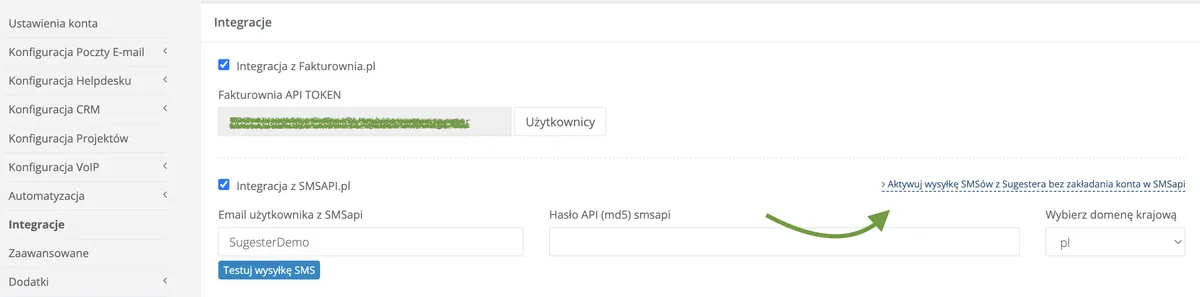
You can do this in two ways: either activate an account in SmsApi first and then proceed to enable the integration in Sugester (detailed instructions are available here), or - the much simpler option - fill in the form in the "Integrations" tab on your Sugester account (Settings → Account Settings → Integrations) and let us handle it for you.
Integration complete!

We have been working with the Polish provider Telecube.pl for years, which allows us to offer Sugester users an internet telephony service.
Calls are made using the PBX configured on your Telecube account. Every completed call is transferred from Telecube to Sugester and displayed in the system under the VoIP tab.
Important note - all settings related to queues, redirects, and messages are configured on your Telecube account. In Sugester, on the other hand, you have extensive options for call verification and analysis: you can check the daily call count broken down by answered/missed, average call duration, the most commonly discussed topics, or who handled the most calls.
Where do I get a phone number?
If you already have a business phone number, you do not need to change anything. Simply transfer it from your current operator to Telecube. Before transferring your number, review Telecube’s offer for landline and mobile numbers.
Start with Telecube:
Create an account in Telecube and activate the Virtual PBX service.
Transfer your phone number from your current operator or purchase a new number through Telecube.
Then in Sugester:
Activate the VoIP module by going to Settings → Modules.
Go to "Integrations" (Settings → Account Settings) in Sugester, then enter the login (for Telecube, the login is your email address) and password from Telecube.pl, and save the changes at the bottom of the page.
Add the phone numbers you will be using to your Sugester account.
The integration with InvoiceOcean makes it easy to connect your CRM with invoice creation and viewing.
The integration allows seamless switching between the two systems with a single button. Once the integration is activated, you share a common customer database, which means that every time you create or edit a customer in one system, the same change happens in the other.
The integration is not just about a shared database - it also connects invoices and deals. What does that mean? When you add a new deal for a customer in Sugester, you can jump to InvoiceOcean with a single click, where an invoice will already be waiting for you, automatically created with the data pulled from the deal you created in the CRM.
The same works in reverse - if you issue an invoice for a customer in InvoiceOcean, a new deal for that customer will automatically appear in Sugester. The deal will also include a link to view that invoice in InvoiceOcean.
The integration can be enabled from either your Sugester account or your InvoiceOcean account.
In Sugester, simply go to the "Integrations" tab, check the "Integration with InvoiceOcean.pl" checkbox, then go to your InvoiceOcean account, copy the API token, and paste it into the designated field below the checkbox. The only thing to remember is that the API token must always include your InvoiceOcean account name, for example:
If you prefer to enable the Sugester-InvoiceOcean integration from within InvoiceOcean, step-by-step instructions are available here.

The Dropbox integration was created for those who regularly work with large files, both internally and when corresponding with customers.
To avoid overloading messages or having them rejected by the recipient’s server due to attachments that are too large, Sugester allows you to pull files from Dropbox and add them to the CRM.
Currently the integration is one-directional, meaning it allows you to retrieve files, documents, and screenshots stored in Dropbox and add them to a customer’s card in the CRM tab.
To enable the integration:
Done! Another integration activated!

If you want to integrate another external application with Sugester, you can do so using our API. The open Sugester API allows you to, for example, add new customers, create tasks, or send emails through another program.
The available documentation can be found on your Sugester account under Settings → API, as well as in our knowledge base in the Sugester API article.
By integrating Sugester with external applications, you combine the advantages of multiple tools and have them all at your fingertips. Integrations save time and provide a broader perspective when assessing your business operations. The most important information is available in one system - just switch between modules.